Onboarding Responsibilities
- Complete and submit Offer Request Form to HR and Recruitment (once approved by the Regional Manager)
- Prepare onboarding/training schedule
- On employee’s first day:
- Work with HR to ensure all new hire paperwork/tasks are completed in ADP no later than COB of 3rd day of employment
- Meet with the employee to provide a great welcome, set goals and expectations moving forward
- Check in regularly, communicate frequently, and provide feedback to help in their ongoing success and engagement
- For 2022 we are reviewing options to develop a corporate training program with modules for onboarding training requirements
Employee Change and Termination Requests
Change and Termination Form
- Use this form to request and notify HR of any changes to an existing employees, for example:
- Transfers
- Title/position changes
- Pay/salary changes* – requires justification and review with RL
- Worker category changes (FT, PT, temp, etc.)
- Promotions
- Terminations
- Complete the form and submit it to hr@selectdentalmanagement.com
- Once approved by HR:
- Communicate change(s) to employee
- Provide employee a promotion letter, if applicable, which will be prepared by HR
- Termination requests – must advise HR immediately
- Involuntary terminations – must partner with your HR Business Partner prior to any
Offboarding Responsibilities
- HR must immediately be informed of any employee resignations
- Complete and submit Change & Termination Form to HR and Recruitment
- Ensure all IT/computer software access is deactivated
- Collect any company property, including office keys
- Documentation
- Prior coaching, verbal and/or written warnings, recent performance review, PIP, progressive disciplinary process, etc.
Payroll Responsibilities
DEADLINE FOR APPROVALS AND SUBMISSIONS IS NO LATER THAN 12 PM MONDAY OF ANY PAYROLL WEEK, NO EXCEPTIONS
- Timecards must be approved and submitted including resolving any errors and exceptions by 12pm EST on Monday of any Payroll week
- Double check the hour totals are accurate for what was worked by that employee during that week Example: ensure there are no 5am clock-outs vs 5pm, missed punches or forgotten clock-ins after lunch; validate OT hours are accurate
- Overtime (OT) will automatically calculate when payroll is processed, no action is required as long as the hours are correct
- PTO approvals – reject or approve all current pay period pending approvals – otherwise employees will not receive PTO pay correctly
- PTO is only to be paid for the eligible employee’s regularly scheduled hours
- Office Closure days are only to be paid for the employee’s regularly scheduled hours up to a max of 8 hours
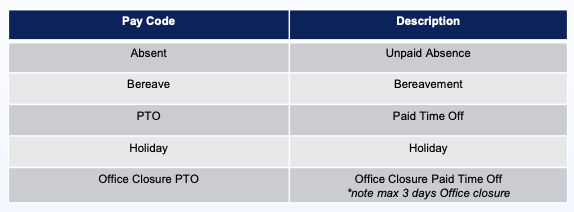
- Ensure all pay rates are coded correctly and additional pay is included (training, bereavement, PTO, holiday, etc.)
- Holiday hours – PLs must manually enter holidays into the timecard for each eligible employee and code as “Holiday” under the pay code section
- Holiday pay for eligible employees is based on regularly scheduled hours: Contact HR for any questions
- If their office is regularly opened the day that the observed holiday falls
- If the observed holiday falls on their regularly scheduled workday
- Bonus pay – send a full list of anyone receiving bonus to Amy Smith, Payroll Consultant at amy@selectdentalmanagement.com and copy HR by the deadline
Timecard Pay Codes